

Visual Mapping transformations
 View as Markdown
Visual Mapping serves as an effortlessly simple data transformation method, designed with a focus on simplicity. It doesn't demand additional dependencies or mastery of programming languages like JavaScript or Python
It's the quickest and most efficient method because it doesn't need to call external functions. Instead, it uses a fast expression engine built into Krenalis.
However, for much more complex use cases, a more powerful language is recommended, such as JavaScript and Python.
Example: Visual Mapping
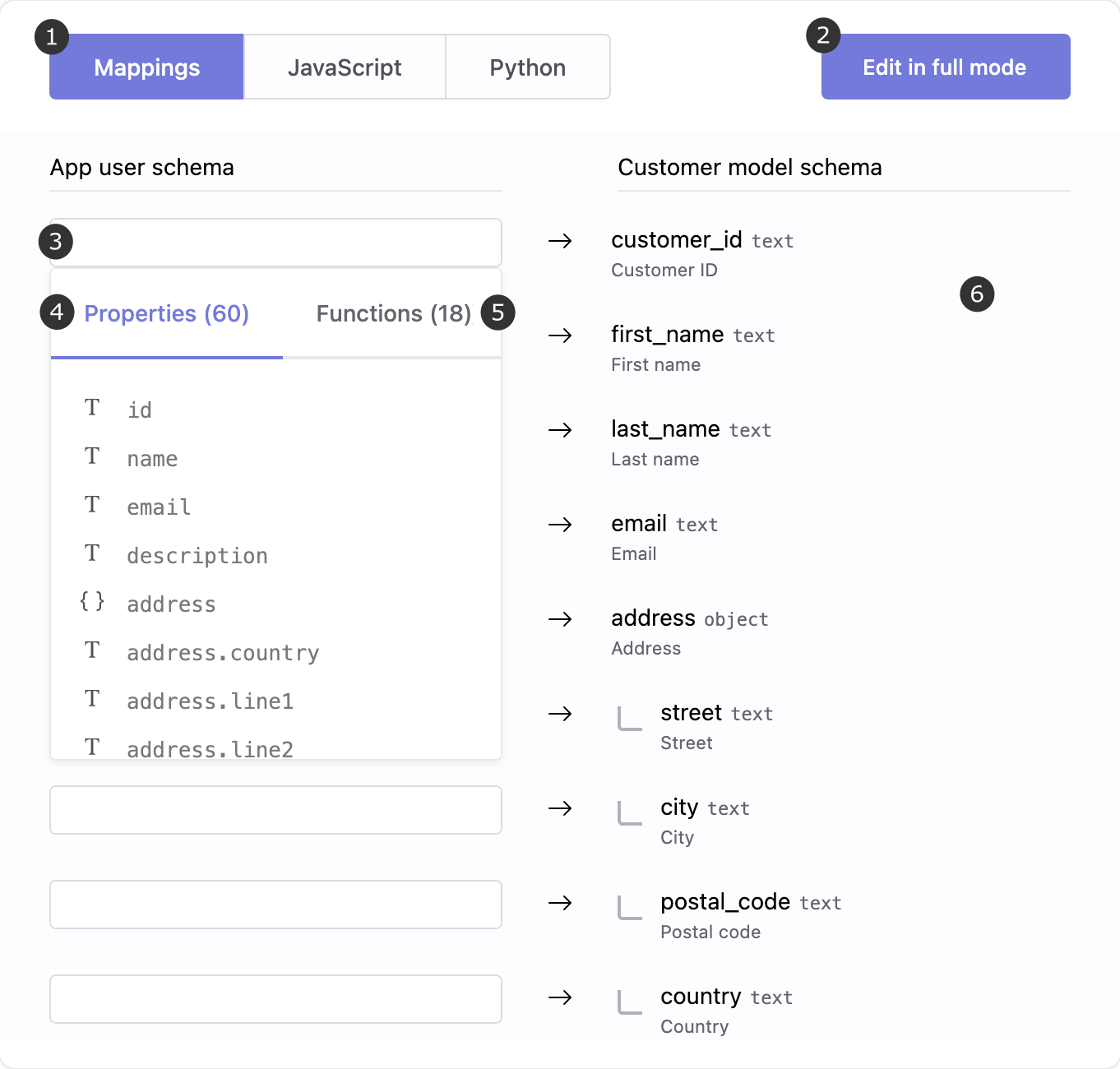
The diagram below shows, in the Admin console, how a user transformation reads data from an app and writes it into the workspace's data warehouse:
- Mappings: open the visual editor to align source and destination properties.
- Edit in full mode: expand the full schema view and test your transformation.
- Input expression: define how each target property is computed.
- Properties: list of available source attributes to use in expressions.
- Functions: built-in helpers for string, date, and numeric transformations.
- Destination properties: customer model properties where the final values are stored.
Map properties
For each output property, you can provide an expression whose evaluation provides its value. In the expression you can refer the input properties.
As an example, the following mapping maps the firstName and lastName properties from the input to the first_name and last_name properties of the output, respectively. The output property email remains unmapped.
┌─────────────────────────────────┐
│ firstName                       │ ->  first_name
└─────────────────────────────────┘
┌─────────────────────────────────┐
│ lastName                        │ ->  last_name
└─────────────────────────────────┘
┌─────────────────────────────────┐
│                                 │ ->  email
└─────────────────────────────────┘
With this mapping, the input:
firstName: "Emma"
lastName: "Johnson"
email: "emma.johnson@example.com"
will become:
first_name: "Emma"
last_name: "Johnson"
If a property is not mapped, its value remains unchanged. If you want to map an output property only in some cases, use the when function.
Constants
You can use the constant null and constant values such as strings, numbers, and booleans:
┌─────────────────────────────────┐
│ null                            │ ->  birthdate
└─────────────────────────────────┘
┌─────────────────────────────────┐
│ "on"                            │ ->  status
└─────────────────────────────────┘
┌─────────────────────────────────┐
│ 50                              │ ->  score
└─────────────────────────────────┘
┌─────────────────────────────────┐
│ true                            │ ->  active
└─────────────────────────────────┘
Strings can also be written with single quotes:
┌─────────────────────────────────┐
│ 'on'                            │ ->  status
└─────────────────────────────────┘
To include a single or double quote within a string, simply prefix the quote with a backslash:
┌─────────────────────────────────┐
│ 'O\'Connor'                     │ ->  last_name
└─────────────────────────────────┘
┌─────────────────────────────────┐
│ "123 Main Street, \"Apt 4B\""   │ ->  street
└─────────────────────────────────┘
Concatenation
Properties, strings, numbers and booleans can be concatenated by writing them one after the other.
┌─────────────────────────────────┐
│ firstName " " lastName          │ ->  full_name
└─────────────────────────────────┘
With this mapping, the input:
firstName: "Emma"
lastName: "Johnson"
will become:
full_name: "Emma Johnson"
Sub-properties, map keys, and JSON object keys
You can reference sub-properties, map keys, and JSON object keys in expressions using either dot notation or square brackets:
┌─────────────────────────────────┐
│ address.city                    │ ->  city
└─────────────────────────────────┘
┌─────────────────────────────────┐
│ properties["birth day"]         │ ->  birth_day
└─────────────────────────────────┘
Accessing a non-existent property causes a compile error. However, trying to access a map key or a JSON object key that doesn't exist will result in null. If the result of the map expression is null, but the output property cannot be null, the output property will be missing from the mapping result. For example, consider the traits property with the following JSON value:
{
    "address": {
        "city": "Milan"
    },
    "phone": "+39 02 12345678"
}
Here, traits.address evaluates to the JSON value {"city":"Milan"}. However, traits.name evaluates to null since name is not a property of traits. Therefore, in the following mapping expression:
┌─────────────────────────────────┐
│ traits.name                     │ ->  first_name
└─────────────────────────────────┘
the first_name output property will be missing from the mapping result if it cannot be null. As a special case, if the output property is of type json and cannot be null, it will be present with the JSON null value.
Attempting to access a non-object JSON value as if it were an object results in an error, causing the entire mapping to fail. For example, the following mapping will return an error because traits.phone is not a JSON object:
┌─────────────────────────────────┐
│ traits.phone.mobile             │ ->  phoneNumber
└─────────────────────────────────┘
To avoid this error, append a ? after the key. This prevents the error if the accessed JSON value is not an object and evaluates to null. The following mapping expression will be evaluated as null:
┌─────────────────────────────────┐
│ traits.phone.mobile?            │ ->  phoneNumber
└─────────────────────────────────┘