

Python transformations
 View as Markdown
Use Python transformations when you need custom logic that goes beyond what Visual Mapping can express. They let you write a transform function with full control over conditions, data manipulation, and complex mappings.
Click Edit full mode to open the transformation editor in full mode, where you can write and test the Python transformation:
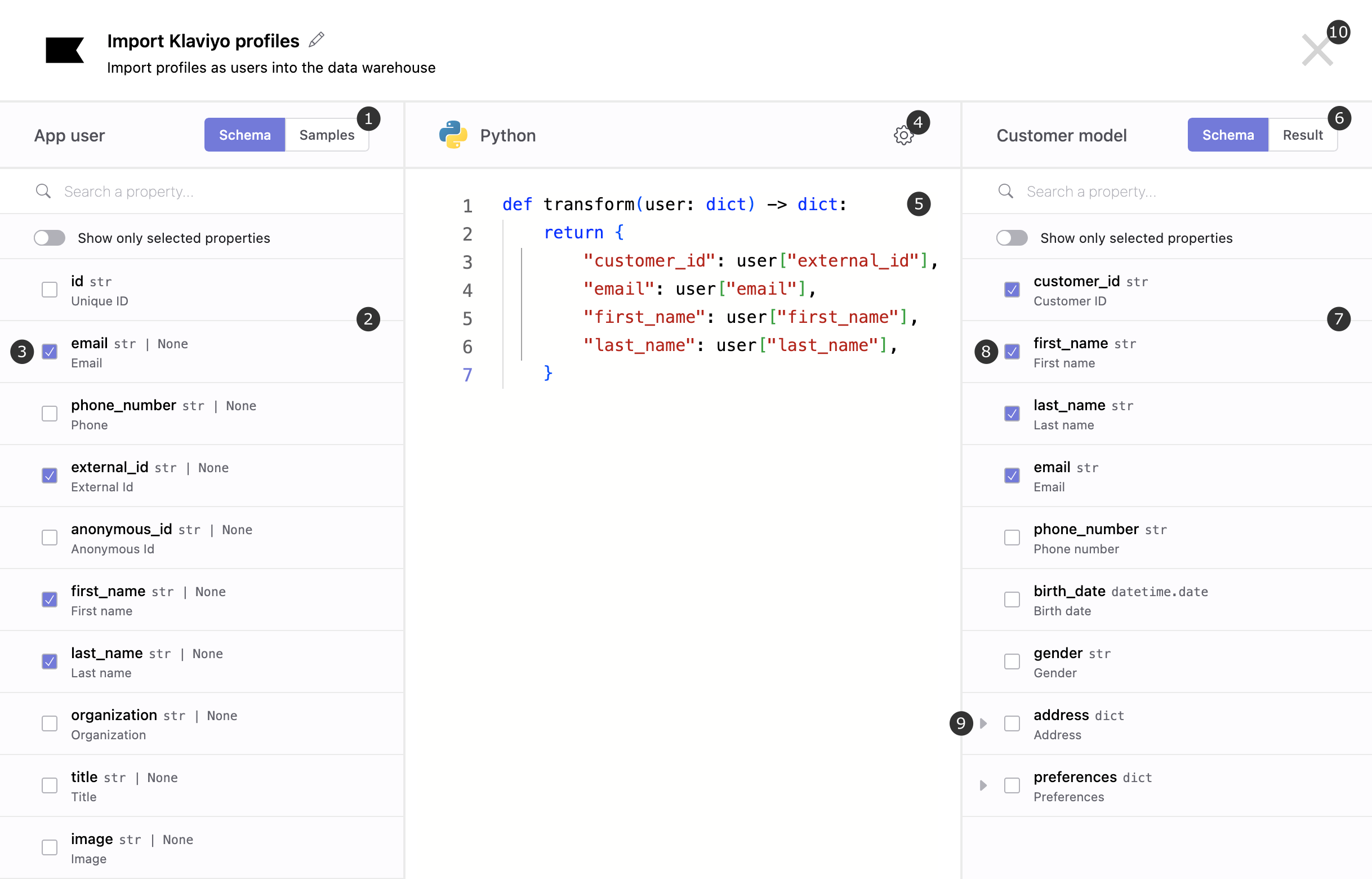
- Schema/Sample: Switch between the source schema and sample input to test the transformation.
- Source properties: Properties from the source schema that, when selected, are included in the dictionary passed to the transformation function.
- Select source property: Selects the properties actually used in the transform function. Krenalis reads and passes to the function only the properties you select. If any of them later changes in the source schema — for example, if its data type changes — Krenalis stops running the transformation until you review and update the function.
- Settings: Opens the settings menu for the transformation. Here you can change how JSON values are passed to and returned from the function during execution.
- Editor: The editor used to write the transformation function. The function must be named
transformand receives a dictionary containing the user data, or event data for event transformations. The input dictionary includes only the properties you selected from the list on the left, and the output dictionary only the properties you selected from the list on the right. - Schema/Result: Switches between the destination schema and the test output.
- Destination properties: Properties from the destination schema that the function returns as the result of the transformation. The function must return only the properties you select, and no others.
- Select destination property: Selects the properties actually returned by the transform function. If any of these properties ever changes in the destination schema — for example, if its data type changes — Krenalis stops running the transformation until you review and update the function.
- Expand: Expands dictionary-type properties so you can view their nested properties.
- Close: Closes full mode when you're done writing and testing the transformation, and returns you to the main view where you can save your changes.
Transformation examples
To transform either user data or events, Krenalis calls the Python function transform. The function receives a single argument:
- an event dictionary for event transformations
- a user dictionary for user transformations
Below are example transformations illustrating how user and event data can be reshaped in Python.
Collecting a user
import re

def transform(user: dict) -> dict:
    return {
        "email": user["email"],
        "first_name": user["firstName"],
        "last_name": user["lastName"],
        "full_name": f"{user['firstName']} {user['lastName']}",
        "is_adult": user["age"] >= 18,
        "signup_year": user["createdAt"].year if "createdAt" in user else None,
        "phone_number": (
            re.sub(r"\D", "", user.get("phone", "")) if user.get("phone") else None
        ),
    }
Collecting a user via event
import re

def transform(event: dict) -> dict:
    props = event["properties"]

    return {
        "customer_id": event["userId"],
        "email": props["email"],
        "first_name": props["firstName"],
        "last_name": props["lastName"],
        "full_name": f"{props['firstName']} {props['lastName']}",
        "is_adult": props["age"] >= 18,
        "signup_year": int(props["createdAt"][:4]),
        "phone_number": (
            re.sub(r"\D", "", props.get("phone", "")) if props.get("phone") else None
        ),
    }
Activating an event
def transform(event: dict) -> dict:
    props = event["properties"]

    products = props.get("products") or []

    items = [
        {
            "item_id": p["id"],
            "item_name": p["name"],
            "price": p["unitPrice"],
            "quantity": p["qty"],
        }
        for p in products
    ]

    return {
        "currency": props["currency"],
        "value": sum(item["price"] * item["quantity"] for item in items),
        "items": items,
    }
Configure the Python execution engine
Krenalis supports two Python transformers:
- AWS Lambda — runs Python transformations using your AWS Lambda environment.
- Local — runs Python transformations on the same machine as Krenalis, for development and testing.
Start Krenalis with one of the following configurations.
AWS Lambda
To use Python transformations via AWS Lambda, in addition to configuring your environment for AWS access, provide these configuration values in the environment variables below when starting Krenalis:
| Variable | Description |
|---|---|
KRENALIS_TRANSFORMERS_AWS_LAMBDA_ROLE |
ARN of the IAM Role assumed to execute Lambda functions. |
KRENALIS_TRANSFORMERS_AWS_LAMBDA_PYTHON_RUNTIME |
Python runtime version for AWS Lambda. Example: python3.14. |
KRENALIS_TRANSFORMERS_AWS_LAMBDA_PYTHON_LAYER |
(Optional) ARN of a Lambda layer for Python functions. |
Local
In local mode, Krenalis uses the Python installation available on the machine running Krenalis. Set the following environment variables at startup:
| Variable | Description |
|---|---|
KRENALIS_TRANSFORMERS_LOCAL_PYTHON_EXECUTABLE |
Path to the Python executable. Example: /usr/bin/python. |
KRENALIS_TRANSFORMERS_LOCAL_FUNCTIONS_DIR |
Directory where local transformation functions are stored (a subdirectory named krenalis-functions will be created inside the specified path). This directory should be writable by the user executing the Krenalis executable. Example: /var/krenalis-project. |
KRENALIS_TRANSFORMERS_LOCAL_SUDO_USER |
System user under which to run local transformation function processes. Switching to this user is done in Krenalis via sudo. If left blank, the current user is retained and sudo is not invoked. |
KRENALIS_TRANSFORMERS_LOCAL_DOAS_USER |
System user under which to run local transformation function processes. Switching to this user is done in Krenalis via doas. If left blank, the current user is retained and doas is not invoked. |
If you change the directory after creating pipelines with transformation functions, you must copy the existing krenalis-functions directory to the new location and update the corresponding environment variable.
Local using Docker Compose
When running Krenalis using Docker Compose, Python transformations are executed inside the container. The container includes the Python runtime as part of the Krenalis Docker image, and transformations run under a dedicated system user configured within the container. This mode is intended solely for local development and testing and works immediately without any additional setup.
If you prefer to run Krenalis with Docker Compose while delegating Python transformations to AWS Lambda, update your compose.yaml file. Comment out the KRENALIS_TRANSFORMERS_LOCAL_* variables and add the environment variables required to enable AWS Lambda.
Note: Switching between local mode and Lambda mode is only possible if no JavaScript or Python transformation functions currently exist in your Krenalis instance.
Types
The table below outlines the Krenalis data types and their corresponding Python representations.
| Krenalis type | Python type | Example value |
|---|---|---|
| string | str | "123 Main Street" |
| boolean | bool | True |
| int(n) | int | 2586 |
| unsigned int(n) | int | 2586 |
| float(n) | float 1 | 37.81 |
| decimal(p,s) | decimal.Decimal | decimal.Decimal("5930174.18") |
| datetime | datetime.datetime 2 | datetime.datetime(2024, 1, 15, 8, 51, 49, 822309) |
| date | datetime.date | datetime.date(2024, 1, 15) |
| time | datetime.time | datetime.time(8, 51, 49, 822309) |
| year | int | 2024 |
| uuid | uuid.UUID | uuid.UUID("f956622d-c421-4eca-8d20-efef87f9749c") |
| json | any type 3 | '{"score":10}' |
| ip | str | '172.16.254.1' |
| array | list | [472, 182, 604] |
| object | dict | {"fistName": "Emily", "lastName": "Johnson"} |
| map | dict | {"a": 8073, "c": 206} |
-
float("nan"),float("+inf"), andfloat("-inf")are also accepted as a return value. ↩︎ -
Return values may use any timezone; Krenalis converts them to UTC. ↩︎
-
Serialized JSON values are deserialized into Python values. When returning a value, Krenalis serializes it to JSON. If Preserve JSON is selected for the transformation, JSON values are passed and received as strings (type
str) in their original format, without being decoded or encoded. ↩︎