

Identity resolution
Unify identities into clean, deduplicated customer profiles.
 View as Markdown
When customer data comes from different sources — and sometimes even from the same source — the same person is often represented by multiple identities. An identity may come from a website visit, a mobile app, a CRM, a database, or from files. In Krenalis, identities are created inside source pipelines. Pipelines keep their identities separate by design, even when they belong to the same connection. Over time, these identities describe the same real person from different angles.
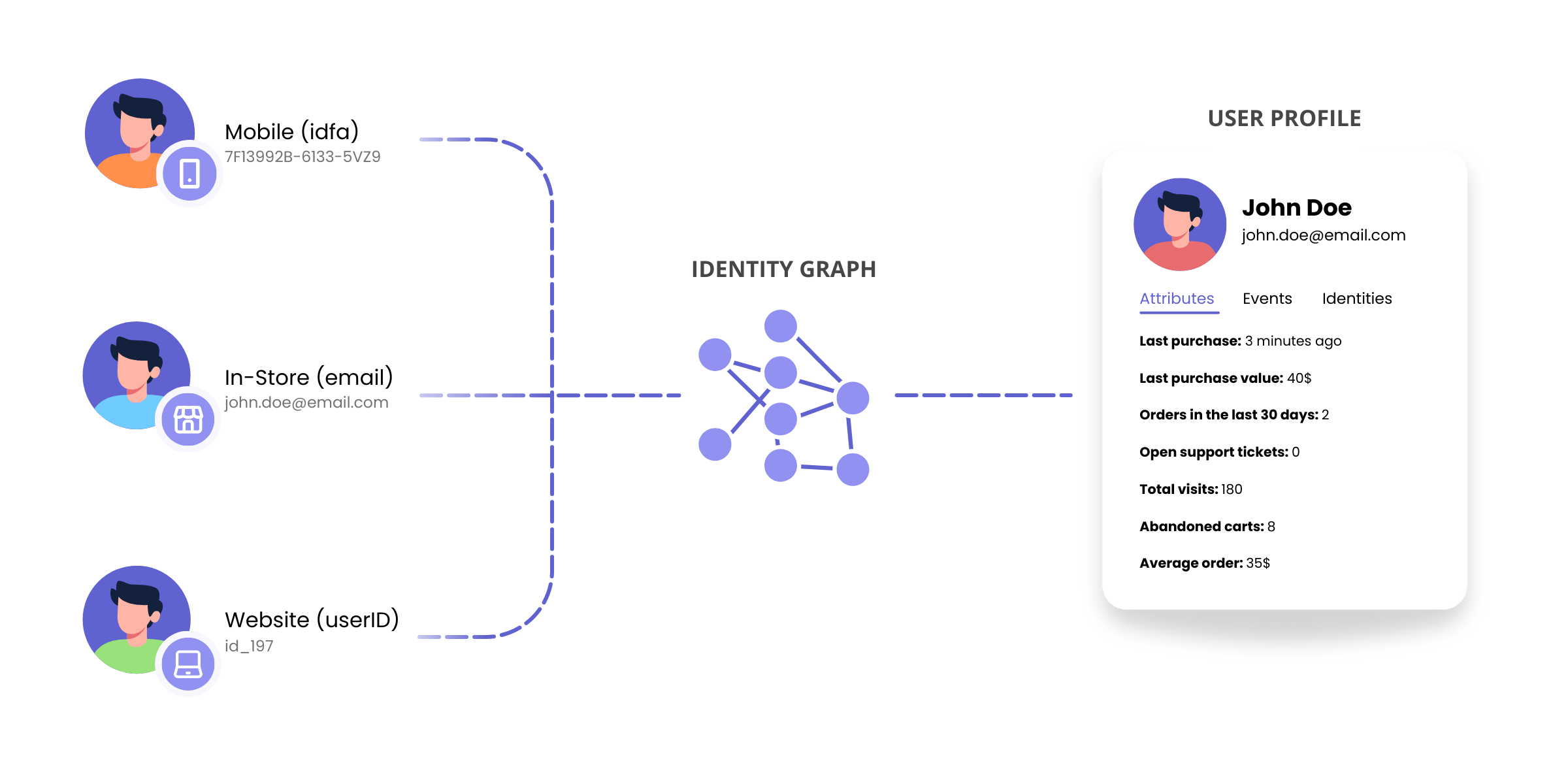
Identity resolution is how Krenalis connects related identities and turns them into one profile. It does this by building an identity graph: a representation of how identities are linked through shared identifiers, such as email addresses, phone numbers, device IDs, or custom keys. From the identity graph, Krenalis derives a single profile that stays consistent as new data arrives.
How identities are matched
Identity resolution applies two rules to determine when two identities belong to the same profile. The first rule reconnects identities coming from pipelines of the same connection using the anonymous and user identifiers. The second rule allows identities to be matched even when they come from pipelines of different connections using identifiers of your choice.
Matching rules
Two identities are considered part of the same profile if at least one rule matches:
-
Identities from the same connection belong to the same profile if:
- they are both anonymous and share the same Anonymous ID, or
- they are both non-anonymous and share the same User ID.
-
Identities from any connection belong to the same profile if:
- they share at least one identifier with the same value, and
- there is no identifier with a higher priority that has a value in both identities.
Identity matching is transitive. If A matches B, and B matches C, then A matches C.
Identifiers of your choice
The second rule matches identities by comparing identifiers of your choice. These identifiers can be selected from profile schema properties (restrictions apply), and you can define their priority, which the matching rule will respect during evaluation.
Because the selected identifiers determine how identities are merged into a single profile, choosing them carefully is essential. You should use stable, unique, and persistent attributes, such as email address or customer ID, to ensure accurate and reliable profile consolidation. Selecting weak or non-unique identifiers may result in incorrect merges or fragmented profiles. In Krenalis, identity resolution is fully reversible and preserves all data. You can change the selected identifiers and their order at any time and rerun identity resolution as needed.
If no identifiers are selected, the second matching rule does not apply. As a result, profiles include only identities from the same connection.
Identifier requirements
An identifier is a profile schema property that meets the following requirements:
- Its type is
string,int,uuid,ip, ordecimalwith a scale of zero. Any semantics is allowed, so, for example, astringwith email or phone semantics can be used as an identifier. - It can be a top-level property or a property of an object, for example
contact.email. Arrays and maps cannot be used as identifiers, whatever their element type, so an array of email addresses cannot be used. - It can appear only once in the list of identifiers.
Values are internally cast to strings and compared using equality.
Identifiers cannot be changed while the profile schema is being altered or identity resolution is running.
Identifiers follow changes to the profile schema. If you rename a property used as an identifier, the identifier is renamed too, keeping its priority. If you remove it, it is also removed from the identifiers.
Identity matching examples
The examples below show how identifier priority and missing values affect identity matching.
First matching example
In this example, two identities are evaluated against three identifiers. Identifier #1 has the highest priority.
| Connection | Identifier #1 | Identifier #2 | Identifier #3 |
|---|---|---|---|
| app | 10 |
45 |
|
| website | 45 |
The two identities share the same value for identifier #3. Identifiers with a higher priority (#1 and #2) do not block the match, because one or both identities do not have a value for them. As a result, the identities belong to the same profile.
Second matching example
Also in the following example there is a match.
| Connection | Identifier #1 | Identifier #2 | Identifier #3 |
|---|---|---|---|
| app | 32 |
19 |
|
| website | 32 |
7 |
23 |
The two identities share the same value for identifier #1, which has the highest priority. Because the match is already determined by the highest-priority identifier, differences in lower-priority identifiers (#2 and #3) do not affect the result. As a result, the identities belong to the same profile.
Non-matching example
In this other example, there is no match.
| Connection | Identifier #1 | Identifier #2 | Identifier #3 |
|---|---|---|---|
| app | 10 |
53 |
|
| website | 25 |
53 |
The two identities share the same value for identifier #3. However, identifier #2 has a higher priority than identifier #3, and both identities have a value for it. Because these values are different (10 and 25), the match is blocked. As a result, the identities do not belong to the same profile.
How profile property values are determined
Once the identities that belong to the same profile have been determined, these identities are merged into a single profile by merging, one by one, all their properties, including identifiers.
- If none of the identities provides a value for a given property, the profile does not have a value.
- If exactly one identity provides a value, the profile simply takes that value.
- If multiple identities provide a value, the profile takes the freshest value among those identities — that is, the one most recently updated at the source. If the property has a primary connection, the freshest value is selected only from the identities belonging to that connection.
As a special case, if the property is an array, the values of the arrays of the identities are concatenated into a single array, without duplicated values. The ordering of the values in the array is warehouse platform dependent.
What "freshness" means depends on the source type:
- For applications, freshness corresponds to the last time the application updated the user. Applications such as HubSpot track when a record is updated, and Krenalis uses this information.
- For databases, freshness is determined by the column configured in the pipeline to represent the row's last modification timestamp. If no such column is configured, freshness is determined by the date and time of the last import.
- For files, freshness is determined by the column configured in the pipeline to represent the row's last modification timestamp. If no such column is configured, the file's last modification time is used.
- For event-based sources, such as websites and mobile apps, freshness corresponds to the event timestamp — that is, when the event occurred.
Example: merging multiple identities
For example, consider three identities that belong to the same profile.
| Connection | Updated at | name | phone_numbers | total_orders | |
|---|---|---|---|---|---|
| website | Jan 1, 2026, 12:00 | alex@acme |
Alex |
{+11 111} |
10 |
| mobile app | Jan 2, 2026, 12:00 | alex@acme |
{+22 222, +33 333} |
35 |
|
| database | Jan 3, 2026, 12:00 | alex@acme |
21 |
The resulting profile is built by merging the properties from all identities:
| Updated at | name | phone_numbers | total_orders | |
|---|---|---|---|---|
| Jan 3, 2026, 12:00 | alex@acme |
Alex |
{+11 111, +22 222, +33 333} |
21 |
Example with a primary connection
Now suppose that connection "mobile app" is configured as the primary connection for the total_orders property.
In this case, even though identity "database" was updated more recently, the value for total_orders is taken only from identities belonging to the primary connection. The resulting profile becomes:
| Updated at | name | phone_numbers | total_orders | |
|---|---|---|---|---|
| Jan 3, 2026, 12:00 | alex@acme |
Alex |
{+11 111, +22 222, +33 333} |
35 |
Here, the value 35 comes from connection "mobile app", because it is the primary source for this property—even though a fresher value exists in another source.
Krenalis Profile ID (KPID)
When Identity Resolution creates a profile, Krenalis assigns it a unique identifier called the Krenalis Profile ID, or simply KPID. It identifies a profile at a specific point in time and is used to reference it consistently across the system.
As profiles evolve with new data, the KPID remains the same as long as the set of identities in the profile does not change. This allows the profile to grow while staying easy to track.
An KPID changes only when the structure of the profile changes—when profiles are merged or split. In these cases, the original KPID is replaced with one or more new KPIDs that represent the newly formed profiles. This ensures that every KPID always refers to a clear and well-defined version of a profile.
Unifying events into a coherent customer journey
Once identity resolution has connected identities into profiles, people who previously looked different are recognized as the same person.
At that point, events also start to make sense. Interactions that once appeared as separate and unrelated paths can now be read as part of a single story, where fragmented signals become a coherent sequence of actions that describes how a person actually moves over time.
This applies not only within a single website or application, but across multiple sites and applications. Events collected from different sources, at different moments, and under different identities are put together to create a single customer journey.
Identity resolution makes this possible by associating events with profiles. When it runs, Krenalis links each event in the warehouse to the profile it belongs to, so that every profile includes the interactions generated by the same person, wherever they happened.
First, each event is associated with the identity coming from the same connection:
- if the event is anonymous, its Anonymous ID matches one of the Anonymous IDs of the identity
- if the event is non-anonymous, it has the same User ID as the identity
Then, the event is associated with the profile to which that identity belongs. Krenalis does this by storing the Krenalis Profile ID (KPID) on the event.
As identities are matched and profiles are rebuilt over time, Krenalis updates the KPID on events as well. This ensures that events always reflect the most up-to-date understanding of who that person is, even as new data arrives.
Run identity resolution
Identity resolution runs directly on the identities stored by pipelines in your data warehouse. When it runs, Krenalis evaluates the current set of identities across all pipelines and rebuilds profiles based on the configured matching rules. User data is never copied or moved outside the warehouse, not even temporarily.
The time required to complete the operation depends on the number of identities involved and on the performance of the underlying warehouse. Small datasets may complete in a few seconds, while larger datasets may require more time.
When identity resolution runs
You control when identity resolution is executed:
- Manually, from the Admin console
- Automatically, after each batch import
- Via API, when you need to trigger it programmatically
Each run always works on the latest state of identities stored in the warehouse.
How results are applied
Identity resolution runs alongside ingestion. While pipelines continue to create or update identities—through batch imports and identities collected from events—Krenalis rebuilds profiles using the identities available at execution time.
Profiles are not updated in place. Instead, Krenalis writes the newly computed profiles into a new table in the data warehouse. Until the operation completes successfully, the profiles view continues to point to the previous set of profiles. Once the rebuild finishes, Krenalis switches the view to the new result in a single step.
This allows identity resolution to run without interrupting data ingestion, while ensuring that anyone querying profiles always sees a complete and consistent result.